Contact form
Knowledge management
A new generation knowledge base for AI-native companies: governed, accessible to AI and comfortable to read for people
Knowledge for people and AI
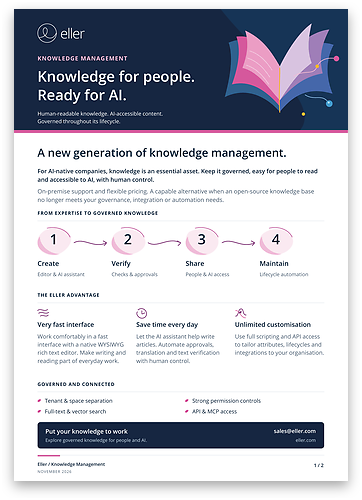
When AI assistants and agents do part of the work, company knowledge becomes their working material. It has to be correct, approved and available to them – and still pleasant for people to write and read. Knowledge management in Eller Conclusion is built for exactly that.
Readable for people
- Native rich text editor – write as in a word processor: headings, lists, tables, images and links, no markup to learn
- Reader view – a clean layout for comfortable reading, with search, featured and recent articles
Accessible to AI
- MCP access – AI assistants and agents search and read the knowledge base through the Model Context Protocol
- Full-text and vector search – find articles by exact words or by meaning
Governed
- Approval lifecycle – articles are reviewed and approved before they are published
- Strong permissions – roles and groups decide who can read, write and approve
A native editor, with AI at hand
Authors write in a WYSIWYG rich text editor right in the browser – no plugins and no markup. The built-in AI assistant drafts new articles and helps improve existing ones, so documentation gets written instead of postponed. Drafts, feedback and approvals are right next to the text.

Comfortable to read
Readers get a clean view without editing tools: a search box, featured and recent articles and the folder tree. Long policies and guides stay easy to read, and any article can be exported to PDF for sharing, printing or archiving.

Organized for the whole company
Knowledge of teams, business units, customers and partners in one system – separated where it must be, connected where it helps.
Tenants and spaces
- Multi-tenant – several organizations or business units in one system, each working only with its own knowledge
- Separate spaces – knowledge spaces for teams, products or customers, each with its own access rights
Folders and attributes
- Folders – structure articles the way your organization works
- Custom attributes – add your own fields such as owner, product or validity, without programming
Files and documents
- Attachments with versioning – files stay with the article and earlier versions are kept
- PDF export – articles as formatted PDF documents
Knowledge that stays correct
Outdated or unapproved content misleads people and AI alike. An automated article lifecycle keeps the knowledge base reviewed, translated and checked without manual chasing.
Review and approval
- Approval workflow – a draft is sent for approval and published only once it is approved
- Reader feedback – feedback on an article is collected right with it, for the author to act on
Translation and verification
- Automatic translation – articles are translated into the languages you need as part of the lifecycle
- Text verification – automated checks of the article text before it is published
Automation
- Notifications – authors and approvers get an e-mail or chat message when an article is waiting for them
- Your own rules – lifecycle steps and events can run your own scripts
Open, programmable and secure
The knowledge base is part of your IT landscape, not another island. Articles, folders and attributes are fully available to scripts, integrations and AI.
AI, API and scripting
- MCP access – connect AI assistants and agents to your knowledge
- Full API – read, create and update articles from other systems
- Scripting – automate the knowledge base with server-side scripts
Identity and permissions
- IAM integration – users, groups and sign-in from your identity management
- Permission control – fine-grained access rights by roles and groups, down to individual articles
E-mail, chat and other sources
- E-mail and chat – notifications and links to articles where people already communicate
- External knowledge sources – connect knowledge from other systems, so people and AI find it in one place
A new generation knowledge base
Open-source wikis are a good start, but their functions reach their limits once knowledge has to be governed, secured and used by AI.
More than an open-source wiki
- Governance built in – approvals, versioning and permissions instead of free-for-all editing
- Ready for AI – vector search and MCP access without plugins
- No add-ons to assemble – multi-tenancy, spaces, custom attributes and PDF export are part of the product
Your deployment, your data
- On-premise or SaaS – your own servers or Eller Cloud with data in the EU
- Flexible pricing – a pricing model that fits the size of your organization and the way you deploy
One platform
- Linked records – articles can be linked to tickets, projects, requirements and other records in Eller Conclusion
- Grow as you need – add service desk, project management or compliance on the same platform